How to Install a SIM Card and Activate Your Smartphone with sparrow
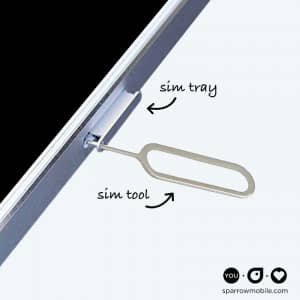
Follow these easy steps to install your sparrow SIM and activate your smartphone with sparrow.
Preparation
You’ll need your smartphone, sparrow SIM card and a SIM tool (a small metal tool that is normally packaged with your phone). If you don’t have a SIM tool, a small metal paperclip can also work.
First, punch out and detach the SIM chip from the SIM card and keep it handy.
Now, with your smartphone off, locate your SIM card tray by looking for a small hole in the side of your device.
Installation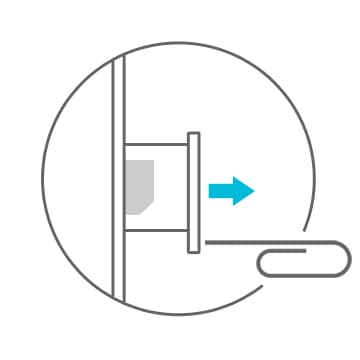
- Insert a SIM tool into the SIM tray hole.
- Apply gentle, but firm, pressure and push until the SIM tray pops out.
- Remove the SIM tray and place the sparrow SIM chip into the tray, matching the notched corner.
- Carefully reinsert the SIM tray until it clicks back into place.
Activation
Turn your device on and give it a minute to locate the network. If it doesn’t locate the network right away, you may need to restart it.
Try a test call, remember to setup your voicemail and you’re good to go.
Want to join sparrow but don’t have a sparrow SIM card? No problem! Learn how to Bring Your Own Device (BYOD) to sparrow and check to see if your smartphone is eligible by contacting our friendly team.
Questions? Call 844.697.7277 or email and we’ll be glad to help.